How to Dispute a Chargeback: A Step-by-Step Guide for Merchants
How to dispute a chargeback as a merchant: read the reason code, work back from the deadline, match your evidence to the code, write the rebuttal, and submit.
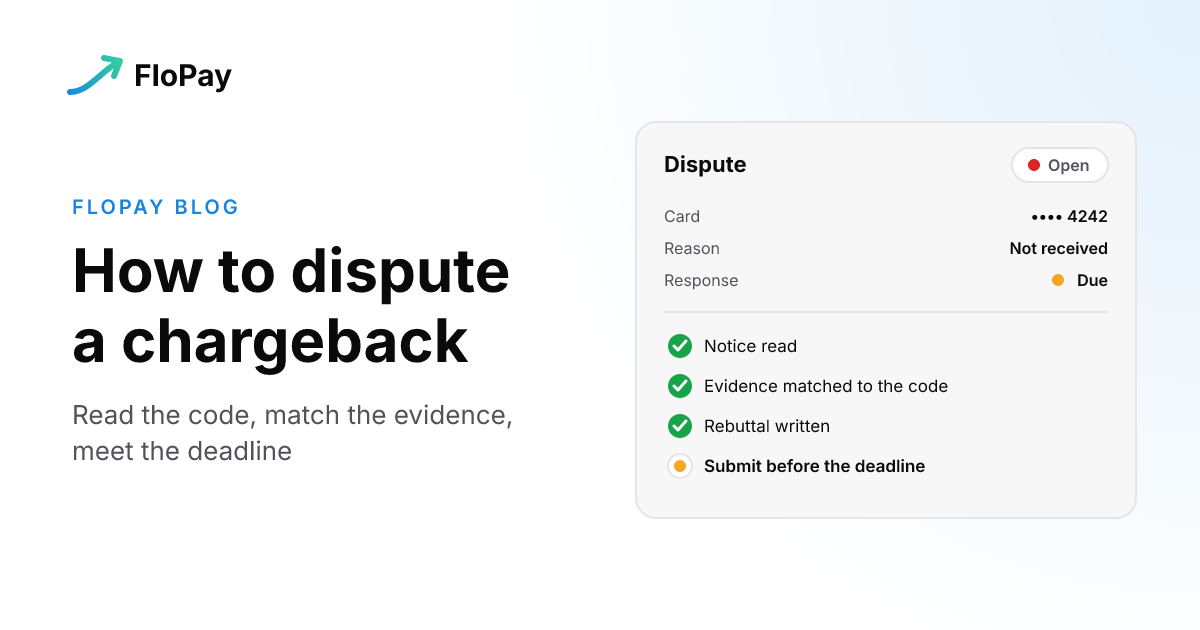
A chargeback notice means a cardholder has disputed one of your payments with their card issuer, and the clock is running. You can contest it. The process is called representment: you send evidence that the charge was valid, and the cardholder's issuer makes the final decision, as Mastercard's guidance for merchants sets out.
This guide is for merchants. If you're a cardholder disputing a charge on your own card, ask the merchant for a refund first, then file the dispute with your card issuer. Equifax's chargeback explainer covers that side.
If no chargeback has been filed yet, you have better options than fighting one, and they're in Dispute Prevention: A Practical Guide for Modern Merchants and How to Prevent Chargebacks: A Merchant's Playbook. This guide starts where those stop: the chargeback exists, and you have to decide what to do about it.
The steps at a glance
- Read the notice: the reason, the amount and the deadline.
- Work back from the deadline.
- Decide whether this one is worth contesting.
- Gather evidence that answers the reason code.
- Write a short rebuttal.
- Submit everything before the deadline, where the dispute lives.
- Act on the decision.
Step 1: Read the notice
Your acquirer, the bank or processor that takes card payments for you, tells you when a cardholder disputes a charge. The notice carries a chargeback reason code, the basic reason for the dispute, such as an item that never arrived or one that was defective. It also carries your deadline. Read the reason, the amount and the deadline before anything else: the reason decides which evidence counts, and the deadline decides how long you have to find it.
On FloPay, those facts arrive as one event. When a processor opens a dispute on a payment, FloPay sends one dispute.created event for the case. It carries the status (open), a plain reason such as fraud or a cancelled subscription, the amount, the payments it is linked to, and the date by which the processor needs your evidence or refund. Each later change arrives as dispute.updated, and the result as dispute.won or dispute.lost. The dispute events reference has the full payload.
Step 2: Work back from the deadline
Mastercard puts the numbers this way: acquirers' timeframes average 10 to 35 days, each card network has its own rules with a deadline typically 20 to 45 days after you're notified, and the whole process can take up to 120 days. The date that binds you is the one on your notice. Miss it and you lose the dispute by default, which means losing the sale and paying the chargeback fee as well.
Put that date in a shared calendar the day the notice arrives, and set your own internal date a few days earlier, so one missing document doesn't cost you the case.
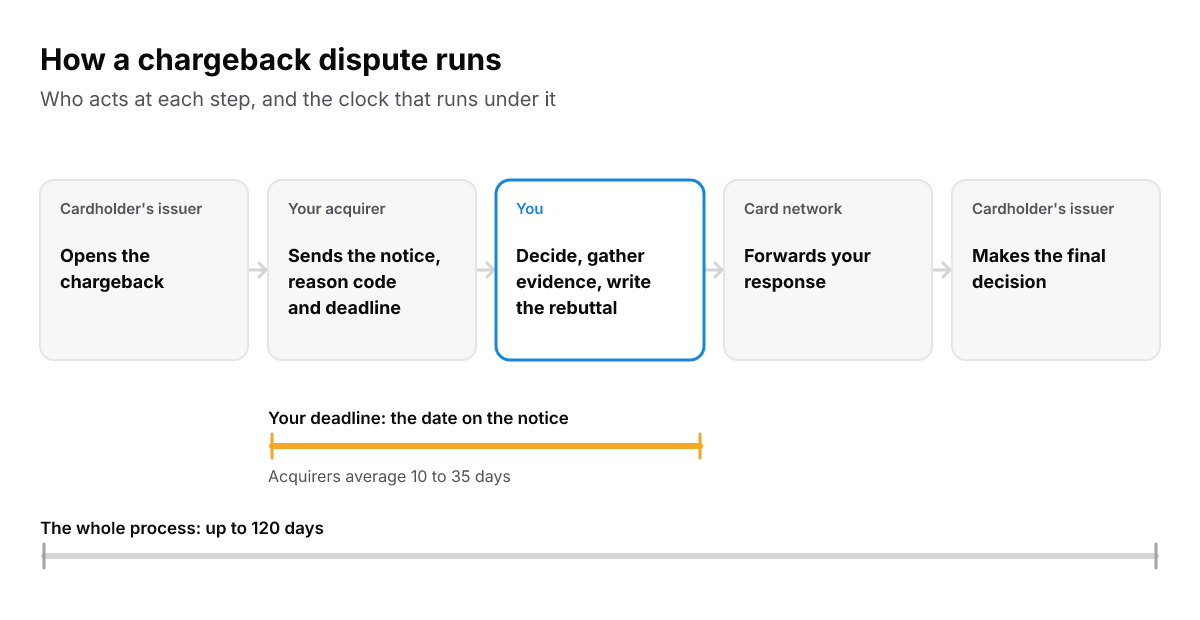
Your part sits in the middle, and the date on the notice is the only one that binds you.
Step 3: Decide whether it's worth contesting
Not every chargeback is worth fighting. Mastercard names three things to weigh:
- Liability. Merchants are generally liable for all chargebacks on card-not-present sales, such as online orders. On card-present sales, the merchant isn't liable when the reason is genuine fraud. The chargeback fee applies either way.
- Your evidence. Strong compelling evidence gives you a good chance of keeping the sale. If your evidence is weak, reconsider.
- Your chargeback ratio. A dispute you win still counts toward your chargeback ratio, the figure used to judge how risky a merchant is. A high ratio can bring higher fees and, at worst, a frozen merchant account.
Across FloPay merchant accounts, most disputes are fraud-related. Consumer and quality disputes come next, then subscription and recurring billing, and processing errors are rare. FloPay has no rule of its own on which reasons not to contest, so make the call case by case. If the cardholder is right, say you charged twice or never sent a refund you promised, no evidence will win it. Accept the chargeback and fix the cause.
Step 4: Gather evidence that answers the reason code
Compelling evidence is evidence that directly answers the reason code. Sending everything you have is not the same thing. Collecting those records before any dispute starts is covered in Dispute Prevention; here the job is picking the ones that answer this notice. Collect only what privacy law allows and what you can protect.
Mastercard gives two pairings directly: if the customer says the item never arrived, send delivery or usage evidence; if the reason is card-not-present fraud, send the IP address of the device the purchase came from. The rest follow the same rule, drawing on the records Mastercard lists, such as AVS (address check) and CVV (security code) matches, the refund or return policy the customer agreed to, and your correspondence with the customer.
| The reason, as FloPay names it | Evidence that answers it |
|---|---|
| Fraud or unauthorized | AVS and CVV matches, the device's IP address, the exact time and date, the device location, the customer's purchase history |
| Not received | Delivery confirmation, or usage records for a digital product or service |
| Not as described | The refund or return policy the customer agreed to, and your correspondence with them |
| Cancelled subscription | The consent and terms the customer agreed to, your cancellation terms, and usage after the renewal (see below) |
| Credit not processed | The refund or return policy the customer agreed to, your receipts and your correspondence |
Step 5: Write a short rebuttal
Along with the evidence goes a chargeback rebuttal letter: a cover letter that summarizes your evidence and shows why the dispute is unwarranted. Mastercard's advice is that it doesn't need to be long, but it must leave no doubt. A simple shape:
- The transaction: the date, the amount, what was bought, and the last four digits of the card.
- The claim: the reason code and what the cardholder says happened.
- Your answer: one sentence on why the claim doesn't hold.
- The evidence: each document by name, with one line on what it proves.
- The request: that the chargeback be reversed.
Step 6: Submit before the deadline
Send the letter and the evidence to your acquirer before the date on the notice, through the channel your processor gives you.
Can you submit evidence through FloPay? Not today. FloPay tracks each Stripe, PayPal and Worldpay dispute as one record and lets you link it to the right payment. You submit the evidence itself in the processor's own dashboard, before the deadline FloPay shows. Worldpay disputes reach FloPay once FloPay Operations has approved those event types for your account.
Step 7: Act on the decision
Your acquirer forwards what you sent to the card network, which forwards it to the cardholder's issuer, and the issuer decides. If the chargeback is denied, the amount comes back to you. If it's approved, the cardholder keeps the money.
A decision isn't always the end. On FloPay, a further round such as pre-arbitration or arbitration arrives as dispute.updated with the phase set to appeal, and dispute.won or dispute.lost follows only when that round settles, as the dispute lifecycle explains.
Win or lose, look at the reason once more. The same reason coming back from different customers points at something to fix before the next notice arrives.
Subscription and renewal disputes
A dispute on a renewal turns on two questions: did the customer agree to be charged again, and did they cancel? On FloPay, a renewal dispute reaches you with the reason "cancelled subscription", linked to the renewal payment and the customer. FloPay keeps the saved card as a token in its vault, linked to the customer and the renewals it paid.
The consent itself is your record to keep: the terms and version the customer agreed to, when they agreed, and your cancellation terms. FloPay's hosted card form shows its card-storage notice, but that notice doesn't replace your own consent record. The guide to saving payment methods lists what to retain: the consent text and version, the customer's identity, the timestamp and your business purpose.
So the evidence for a renewal dispute is that consent record, the cancellation terms in force when the customer signed up, and usage after the renewal, which is the usage history on Mastercard's list. If the customer did cancel and the renewal charged anyway, the cardholder is right, and Step 3 applies. How renewals are billed in the first place is covered in our recurring billing software guide, and failed renewals in Subscription Recovery.
Disputes across several processors
If you take payments through more than one processor, each dispute lives with the processor that took the payment, under that processor's deadline. FloPay puts disputes from Stripe, PayPal and Worldpay into one record, with the same statuses, reasons and deadlines, so every open case sits in one list.
Here is what's still yours to do by hand. You gather the evidence from your own systems and submit it in each processor's dashboard before its deadline. Each processor must also be set up to send FloPay its dispute notifications: PayPal needs Disputes API access, and Worldpay needs an Operations approval for each event type. A case that is never sent doesn't appear in the list, so check the subscription list on each connector page before you rely on it.
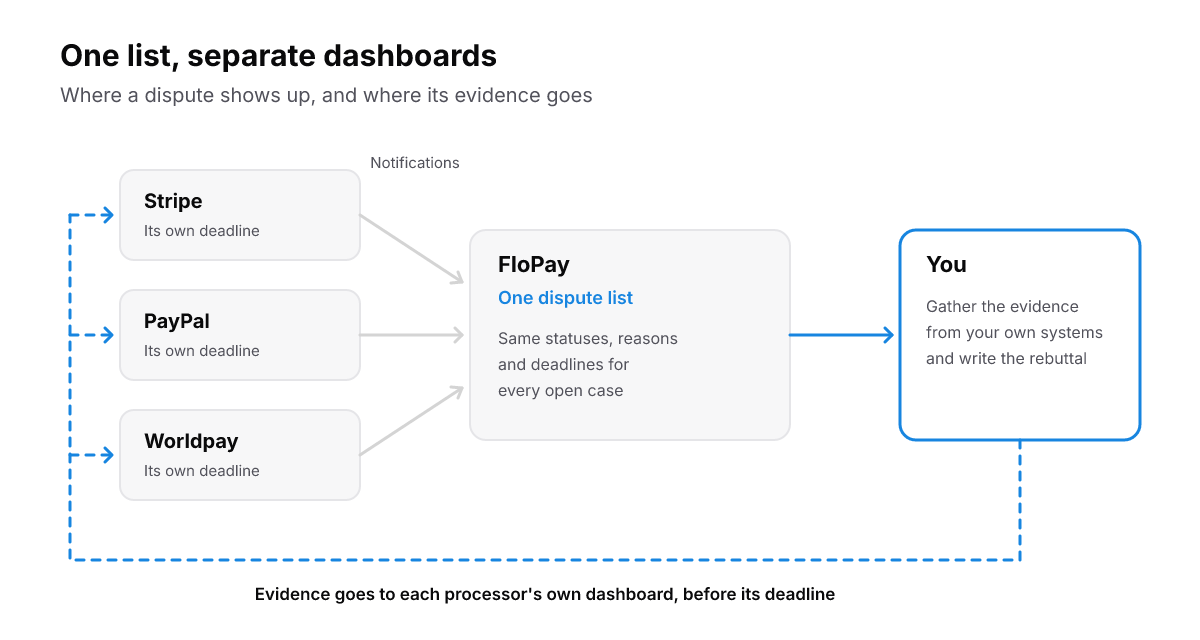
One list to watch, but the evidence still goes to each processor, before each processor's deadline.
Or stop it before it's filed
A pre-dispute alert is an early warning that a cardholder or issuer is likely to dispute a charge. It moves no money, and it gives you a window to refund or respond before a dispute is raised, as the Pre-Dispute Alert events describe.
We changed when alerts reach merchants. FloPay now delivers a pre-dispute alert as soon as it can tell whose it is, before it has been matched to a payment, so you get the whole response window (changelog). When you change the text customers see on their card statements, FloPay also checks whether alerts for the new text would still reach you, because an alert that no longer matches never arrives (alert enrollment check).
The alerts API is in the Pre-Dispute Alerts reference, and the product is FloPay Chargeback Prevention. For the full prevention playbook, from billing descriptors to alert networks, read Dispute Prevention and How to Prevent Chargebacks. If a dispute is already open, go back to Step 1 and check the date.