Hosted checkout links
Create, deliver, and manage production checkout links from the FloPay Dashboard.
Hosted checkout links
A hosted checkout link turns a catalog offer into a reusable FloPay checkout. Each buyer who opens the link gets a fresh payment session, while you keep one offer that you can inspect, edit, or deactivate from the Dashboard.
In the FloPay Docs, open Guides > Hosted checkout links to return to this workflow. For the field-level integration contract, use the Checkout links API.
Choose a checkout surface
Both choices are supported for production payments. Pick the surface that matches how you want to deliver checkout.
| Surface | Choose it when | Buyer experience |
|---|---|---|
Full checkout (full_detail) | You want a hosted URL to share in email, chat, a QR code, or a button. This is the default. | The link opens a complete FloPay page with the order summary and payment form. |
Payment widget only (widget_only) | You want to embed the payment form in an iframe inside your own page. | The frame shows the focused payment embed while your page provides the surrounding order experience. |
The stored surface controls how the link renders. Create a separate link if the same offer needs both delivery styles.
1. Open Checkout links
- Sign in to the production FloPay Dashboard.
- Select the production client context that owns the catalog and gateway you want to use.
- Open the top-level Checkout links area. Client owners and admins can create and change links. Client members can inspect and copy them.
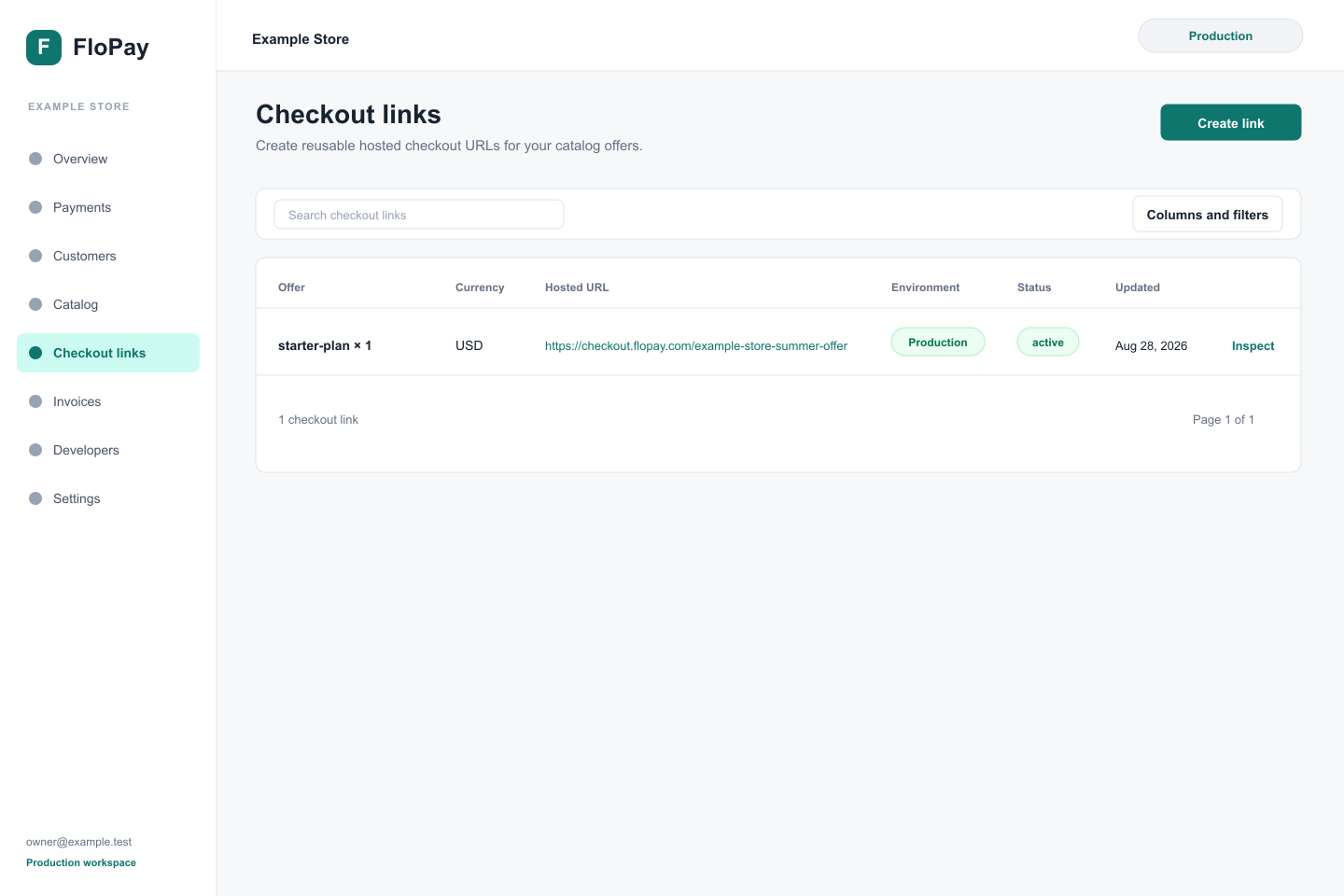
2. Create the offer
- Choose Create link.
- Select at least one active catalog product, then set the quantity and currency. Every selected item must support the same currency.
- Add coupon codes only when they are active for this offer.
- Add the exact success and cancel destinations your organization controls. Both are optional.
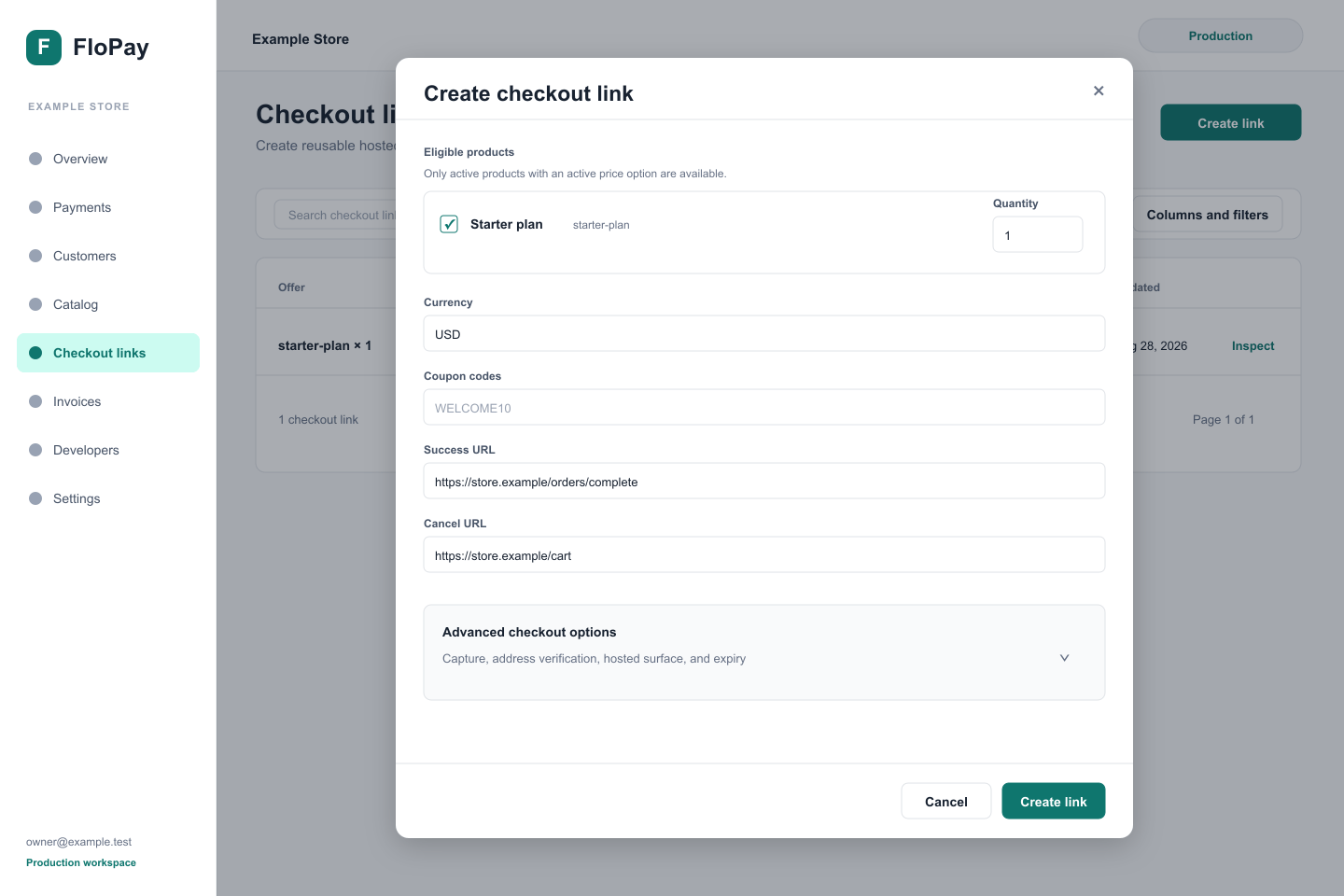
Use live products and prices deliberately. Review the offer before you make the link available to buyers.
3. Choose a checkout surface
- In Advanced checkout options, find Hosted surface.
- Choose Full detail for a shareable hosted page, or Payment widget only for an embedded payment form.
- Leave automatic capture, AVS, and expiry at their defaults unless your payment policy requires another supported choice.
- Choose Create link.
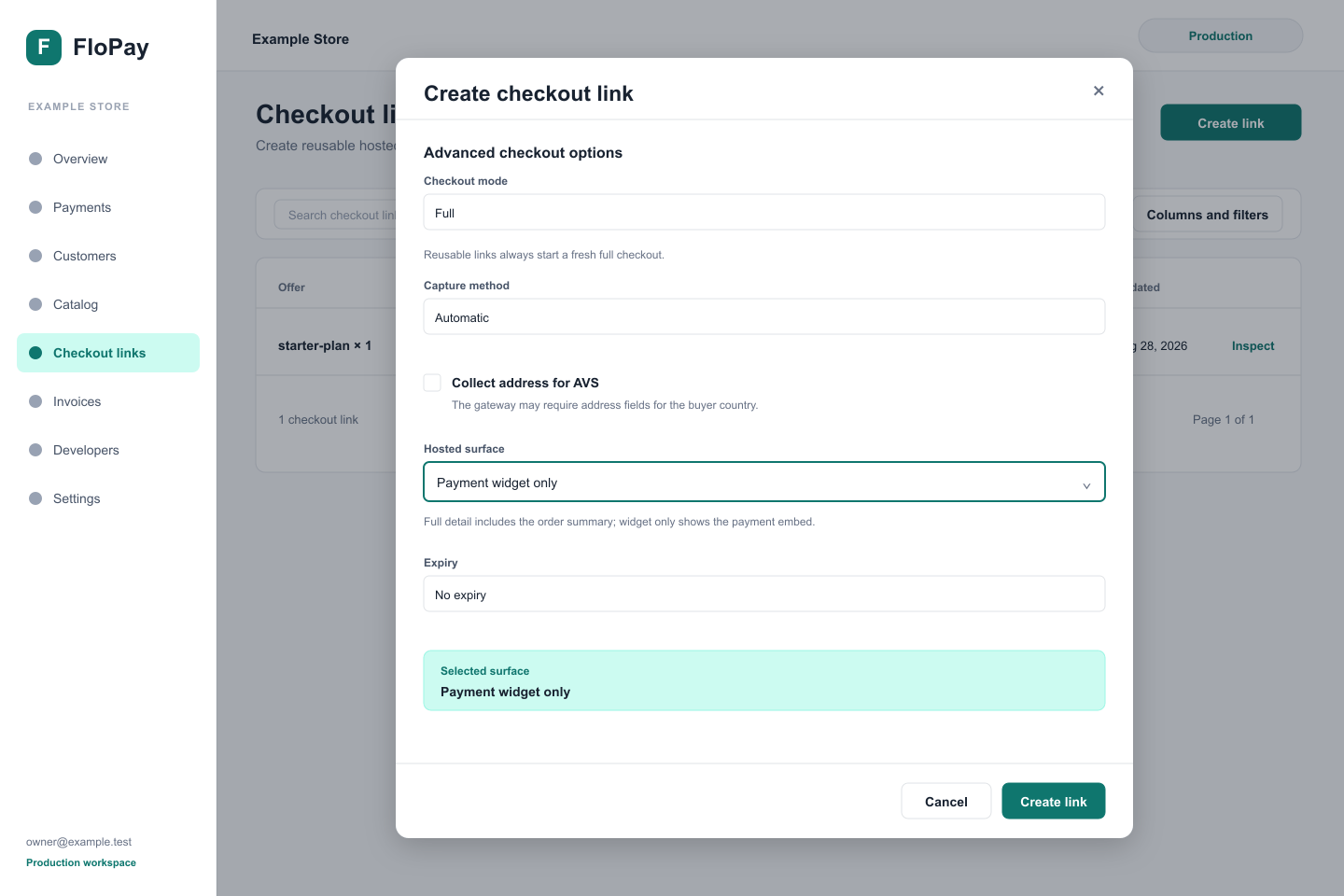
The Dashboard creates the reusable offer and displays the buyer-facing URL returned by FloPay.
4. Deliver checkout
Open the new record and confirm that it is Active and that the copied URL uses the buyer host https://checkout.flopay.com/<opaque-link-token>. Then choose Copy hosted URL.
- For
full_detail, send the copied URL through an approved email or messaging channel, encode it in a QR code, or put it behind a button. - For
widget_only, use the copied URL as an iframe source and add thepresentation=widgetmarker. Embed it only on an HTTPS origin approved for your workspace.
<iframe
  src="https://checkout.flopay.com/<opaque-link-token>?presentation=widget"
  title="Secure payment"
  allow="payment"
></iframe>
Create a separate full_detail link for a full-page fallback. A link keeps the surface selected when it was created.
Do not reconstruct the URL from the record ID or token. The complete copied URL is authoritative.
Pass buyer details when the link opens
The copied URL identifies the offer. When you know who is opening it, append optional buyer fields to that URL. Each open still creates its own payment session. Do not put one person's details on a link you share with anyone else.
https://checkout.flopay.com/<opaque-link-token>?email=buyer@example.com&user_id=customer-42&first_name=Ada&country=GBOn staging, start from the url returned by the staging API. The query names are the same. A widget keeps presentation=widget and adds the same fields:
<iframe
  src="https://checkout.flopay.com/<opaque-link-token>?presentation=widget&email=buyer@example.com&user_id=customer-42"
  title="Secure payment"
  allow="payment"
></iframe>| Query name | Also accepted | Maximum length |
|---|---|---|
email | 100 | |
user_id | userId | 100 |
first_name | firstName | 100 |
last_name | lastName | 100 |
gender | 50 | |
city | 200 | |
state | 200 | |
country | 200 | |
zip | postal_code, postalCode | 200 |
address_line_1 | address_line1, addressLine1 | 500 |
address_line_2 | address_line2, addressLine2 | 500 |
Use the query name in the first column. An alias is read only when that query name is absent. Every field is optional. A blank value, a value longer than its maximum, and an email that is not a valid email address are left off the session. Any other query name is ignored, including return_url. Success and cancel destinations still come only from the link.
The checkout page address does not keep these fields. Refreshing that page does not send them again, so put them on the link for this open.
5. Manage the link
Return to Checkout links whenever the offer changes:
- Choose Inspect to review the status, surface, products, destinations, and hosted URL.
- Choose Edit link to update the offer or checkout options.
- Choose Deactivate link when the URL should stop accepting new buyers.
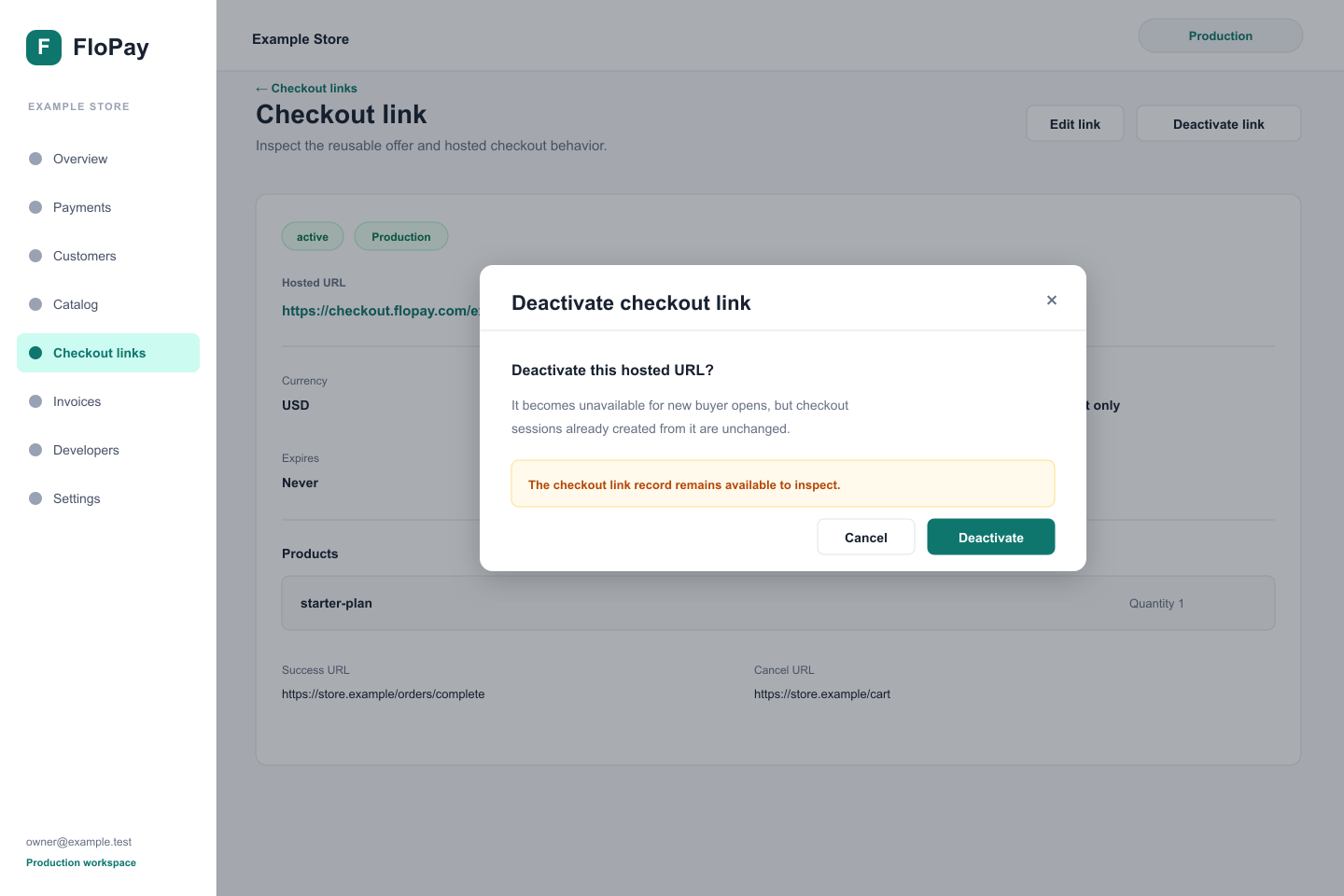
An edit or deactivation affects new buyer opens. It does not change a checkout session already in progress. Deactivation keeps the record for operators but changes it from active to inactive; an elapsed expiry produces the separate expired state.
Security and completion
- Keep merchant credentials, API tokens, and provider secrets in server-side secret storage. Never put them in a hosted URL, browser bundle, iframe attribute, screenshot, log, or support message.
- Never put raw payment data in the offer or URL. Card details are collected inside the secure payment surface. A hosted URL may carry only the optional buyer fields in Pass buyer details when the link opens.
- Configure the exact success and cancel destination your organization controls. Do not accept a caller-provided redirect target or use partial host matching.
- Treat possession of an active link as access to start a checkout. Deactivate and replace a link sent to the wrong audience.
- A success redirect or browser message improves the buyer experience, but it is not fulfillment authorization. Fulfill from a trusted server using a verified API result or webhook.
Every open creates a separate payment session. A settled payment uses the configured success destination. Validation errors, declines, processing, action required, and retryable failures remain in checkout so the buyer can continue safely.
Developers building an SDK checkout inside an application should use Accept a payment instead. That path creates buyer sessions directly and does not manage reusable links.
Troubleshooting
| Outcome | What to check |
|---|---|
| Invalid or tampered link | Copy the complete hosted URL again. Invalid, unknown, inactive, expired, cross-environment, and tampered links all return the same Link unavailable 404. That response creates no new checkout session. |
| Inactive link | Inspect the record. To make the same offer available again, use the authenticated Checkout links API to set isActive: true; the Dashboard cannot reactivate an inactive link. Otherwise, deliver another active link. |
| Expired link | Edit the expiry or deliver another active link. |
| Cross-environment link | Return to the Dashboard context that created the link and copy its complete URL. Do not move only the token to another host. |
| Declined | Keep the checkout open and let the buyer check their details or choose another payment method. |
| Action required | Keep the same checkout open while the buyer completes authentication. Do not mark the order paid yet. |
| Retryable failure | Let the buyer retry through the same session so the payment keeps one idempotency boundary. |
For payment error classes and recovery behavior, read Routing and reliability. Use the authenticated Checkout links API when you need to diagnose or automate link management.