Dunning Management: How to Get a Failed Subscription Payment Paid
Dunning management for subscriptions: what to tell customers before and after a failed renewal, when to cut access, and how to tell recovery is working.
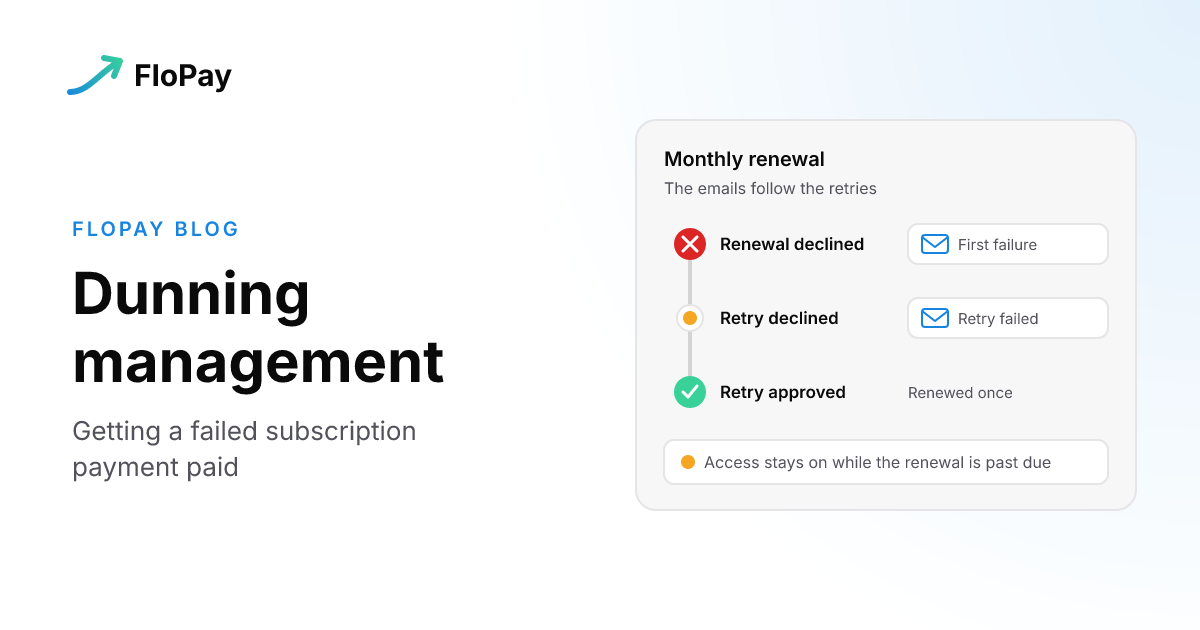
Dunning management is how a subscription business gets a failed or overdue payment paid. It covers four jobs: charging again at the right moments, telling the customer, giving them a quick way to fix their payment details, and deciding what happens to their access while all that runs.
A note on the word. In accounts receivable, dunning also means chasing customers for unpaid invoices. That's the sense behind questions about dunning in collections or in SAP. This guide is about the subscription meaning: a renewal on a saved card or bank account that didn't go through.
The retry side has its own guide. Payment Retries: Which Declines to Retry, When, and How Many Times sets out the schedule and the limits FloPay runs, so we won't repeat them here. This guide covers the rest of the loop, and how FloPay handles each part.
The loop, end to end
Each moment around a renewal has a job, and someone has to own it:
| Moment | What should happen | Who does it with FloPay |
|---|---|---|
| Before the charge | Remind the customer that a charge is coming | FloPay sends the email, if you switch it on |
| The renewal fails | Decide whether to retry, set the card aside or check what happened | FloPay |
| While retries run | Tell the customer, and give them a link to fix their payment details | FloPay sends the emails, if you switch them on |
| Access | Keep it, close it or restore it | Your product, on FloPay's events |
| Afterwards | See what was recovered, and what the emails brought back | FloPay reports it, you read it |
The sections below take these one at a time.
Before the payment fails
Some failures start before the charge: a customer forgets about a yearly plan, or a trial rolls into its first paid charge without them noticing. FloPay can send two reminders before a charge:
- Renewal reminder: by default 7 days before the charge, on plans billed every 3 months or longer. You choose how many days ahead, and the shortest plan that gets one.
- Trial ending: by default 3 days before a trial's first paid charge.
Each one also fires a webhook (subscription.renewal_upcoming or subscription.trial_will_end), even when the email is switched off, so you can send your own message instead. The settings are in the emails guide.
Here's what FloPay doesn't do before a charge today: it doesn't email customers about cards that are about to expire, and it doesn't run an automatic card updater. At the charge itself, a stale saved-card token is refreshed once from the vault before the next saved method is tried. The recurring billing software guide explains how that works.
When the renewal fails
The first decision isn't about messages. It's whether the failure can clear on a later attempt. A card reported stolen won't; insufficient funds might. Payment Retries sorts every failed renewal into three outcomes and gives the schedule for each plan. If you're looking at a single decline right now, Payment Was Declined is the faster read.
What matters for dunning is that everything else follows those retries. While they run, the subscription is past due. Your customer messages and your access rules should key off that same recovery campaign, not run on clocks of their own.
Telling the customer: three emails on the campaign's clock
FloPay sends three failed-renewal emails, each with its own switch:
- First failure: when a renewal fails for the first time.
- Retry failed: after each failed retry.
- Final notice: when the retries run out.
There's no separate email calendar. The emails go out on the recovery campaign's own rounds, so a customer hears about a failed retry when it fails.
Each email carries a button to your hosted manage page, where the customer signs in with a one-time code and updates their payment details. The customer fixes it themselves, and you build nothing. The next retry looks up their saved methods again, so a card they update mid-campaign can pay the renewal, as Payment Retries describes.
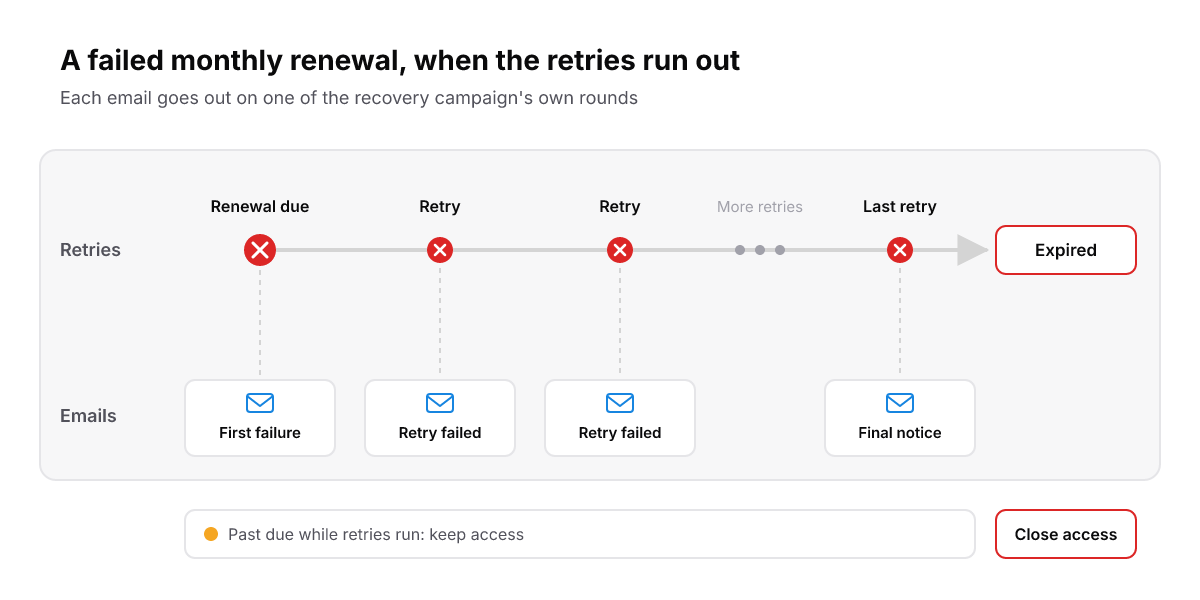
The emails follow the campaign's own rounds. There's no separate email calendar to keep in step.
You can switch each email on or off, and rewrite it as your own template: save a draft, preview it, send a test, then publish. New merchants start with all three on. Existing merchants start with the retry and final emails off until they review them, so check your switches before you count on them. The emails guide has the switches, the templates and the variables each email offers.
When to cut access
FloPay never cuts a subscriber's access itself. Access lives in your own product, driven by FloPay's webhook events. Our advice is simple: a failed payment is not a reason to cut access.
- Keep access while the subscription is past due and retries run.
- Close it only when the subscription expires, on
subscription.expired. - Restore it when the renewal is paid, on
subscription.renewed. - Bank debits: a renewal paid by bank debit that hasn't cleared yet keeps access until the processor gives its final answer.
A past-due subscription is still being worked. Cutting access on the first failure takes the service away from a customer whose card may clear on the next retry, or who is about to update it from the first email.
The same rule covers a charge whose outcome is unknown. FloPay holds that campaign for review and sends no expiry event while it's reviewed, so access stays on until there's an answer. The full event order is in the subscriptions guide.
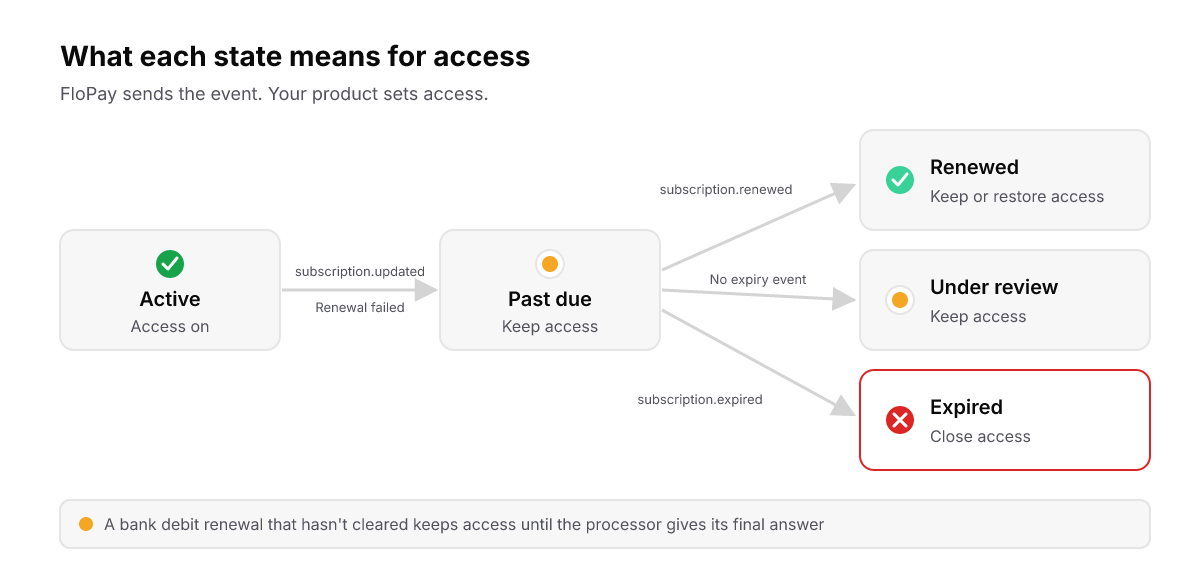
FloPay sends the event. Your product decides access, and only expiry closes it.
How to tell it's working
Three places in FloPay show whether dunning is paying off:
- Rebill Sales and Rebill Revenue. These cards on the Dashboard overview show recovered renewals and revenue beneath their totals. A recovered renewal is counted once, as part of the total, not added on top. The analytics and reporting guide explains the numbers.
- Recovered revenue. This page under Settings, Emails totals the payments the failed-renewal emails brought back. Each payment is credited to the last such email sent in the 7 days before it.
- The subscription's timeline. It shows the next scheduled retry and every recovery round, so support can see where a customer stands.
Each week, compare the recovered count and revenue with your rebill totals. Then check the email log for failed-renewal emails that bounced or were suppressed. A customer who never gets the email can't update their card.
We don't publish a recovery rate yet, so you won't find one here.
What stays with you
FloPay runs the retries and sends the emails. A few things stay with you:
- Access. Your product closes and restores access on FloPay's events, and deduplicates them on
eventId. - The emails. Switch on and review the three failed-renewal emails.
- Provider-billed subscriptions. Subscriptions billed by Stripe or PayPal themselves keep that provider's own retries and emails, and FloPay adds none. See the Stripe and PayPal connector guides.
- Your own retry schedule. You can't set one yet. Every merchant runs on the same defaults, and merchant-level policies are planned.
- Other channels. FloPay reaches the customer by email only, so any text or phone outreach is yours.
- Bank debits. A customer paying by bank debit can't update it on the hosted manage page today.
Choosing dunning management software
If you're comparing tools, start by running one failed renewal through each in a sandbox, as our recurring billing software guide describes. Then add three questions for the customer side:
- Do the emails follow the retries, or run on a calendar of their own?
- Does every email link to a page where the customer can fix their payment details themselves?
- Can you see which email brought a payment back?
The short version
- Dunning is the whole loop after a failed renewal: retries, messages, access and proof.
- Remind customers before long-plan renewals and before a trial ends.
- Let the emails follow the retry rounds, and put a fix-your-card link in every one.
- Keep access while the subscription is past due. Close it on expiry, and restore it on renewal.
- Every week, watch recovered rebills and bounced dunning emails.
See how FloPay recovers failed renewals, read the emails guide, or visit FloPay.