Authorization Rate: How to Read It and What Actually Moves It
Authorization rate explained: how to calculate it per attempt and per payment, why one blended number hides recoverable declines, and what moves it.
Authorization rate is the share of payment attempts that the card issuer approves. Finance, payments and product teams watch it because every attempt the issuer turns down is a sale that didn't happen, or a renewal that didn't renew.
It's also one of the easiest numbers in payments to misread. A single blended rate mixes first tries with retries, new cards with saved ones, and declines you can recover with declines you never will. This guide covers what the rate means, how to count it, why one number hides the revenue behind it, and what actually moves it.
What authorization rate means
When a customer pays by card, your payment provider asks the card's issuing bank to authorize the amount. The issuer approves or declines. Authorization rate measures how often it approves:
Authorization rate = approved attempts ÷ submitted attempts
The rate is about the issuer's answer on a payment. It isn't about authorization forms, and it isn't an API rate limit, two things that share the search term. A payment you authorize now and capture later is still judged on the issuer's answer to the authorization.
The formula is simple. The hard part is deciding what counts as an attempt.
Count it two ways: per attempt and per payment
Here's an illustration with made-up numbers, not FloPay data. A store has 100 checkouts in a week where the customer tried to pay at least once. 80 are approved on the first try. Of the 20 declined, 10 get a second try, on another processor or later, and 5 of those are approved.
- Per attempt: 110 tries, 85 approved. That's 85 of 110.
- Per payment: 100 checkouts, 85 paid. That's 85 of 100.
Same week, same customers, two different numbers. Now say the store retries the other 10 declines too, and none of them clears. The per-attempt rate falls to 85 of 120, while the number of customers who paid stays at 85. When a retry recovers a payment, both numbers go up. When it fails, only the attempt view goes down. Judge your recovery work on the attempt view alone and it can look like it's hurting you.
Shrink it to one checkout. A first try declined on one processor and a second try approved on another is one of two tries approved, and one of one payment paid.
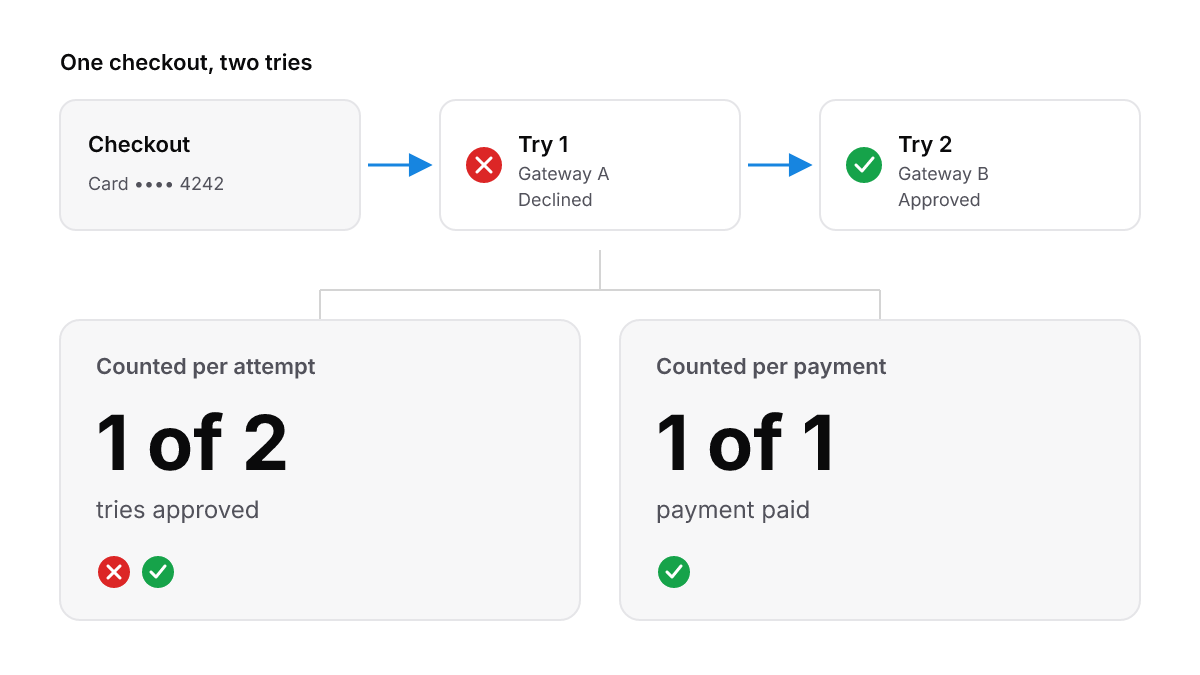
The same checkout is half approved per attempt and fully paid per payment.
That's how FloPay reports it. Our checkout stats give approval rate per attempt: approved tries divided by all tries in the period, so every retry counts as a try of its own. Conversion is reported separately, per checkout: sales divided by checkouts that made at least one attempt. The first is the gross view and the second is closer to a per-payment view. A renewal recovered after a retry is counted inside the rebill totals, never as a second sale.
Read the two side by side. A wider gap between them means more tries for every paid checkout, so more of your revenue depends on retries and second routes. That's worth knowing before you change a processor or a retry rule.
Why one blended number misleads
A blended authorization rate averages payments that behave nothing alike:
- First tries and retries. As above, failed retries pull the attempt view down even when other retries recover money.
- New cards and saved cards. A card typed into checkout and a card charged for a renewal are different payments. There's no buyer on the page for the second one.
- Processors and currencies. One processor can struggle in one currency while the total barely moves.
- Declines you can recover and declines you can't. A generic issuer refusal may clear on a later try or another route. A card reported lost or stolen won't.
The last point is where the revenue sits. Do Not Honor is the most frequent decline FloPay sees across its merchants. We don't publish its share, because it varies too much by country, market and type of business for one platform-wide number to mean anything. What the code means and how to handle it is in Do Not Honor meaning for merchants. If you're looking at one declined payment rather than the rate, start with payment was declined: immediate steps.
What counts as a good authorization rate
There isn't one number. Authorization rates vary by card type, country and checkout. A domestic debit card, a cross-border credit card and a renewal on a card saved last year don't belong on the same scale. We don't publish an authorization rate for our merchants, and we won't quote someone else's benchmark here.
The useful comparison is your own rate, by segment, against your own past. A segment that drops while the others hold tells you where to look. A total that rises only because your mix shifted toward easier payments tells you nothing.
Read your rate by segment
Before you change a route or a retry rule, split the rate:
- By processor. Compare the same kind of payment across each processor you run.
- By currency and country. Read each market on its own.
- By decline reason. Keep issuer refusals, insufficient funds, failed authentication and technical errors apart. Each one has a different fix.
- By attempt. First tries apart from retries, so recovery shows up as recovery.
- By payment type. First payments apart from renewals on saved cards.
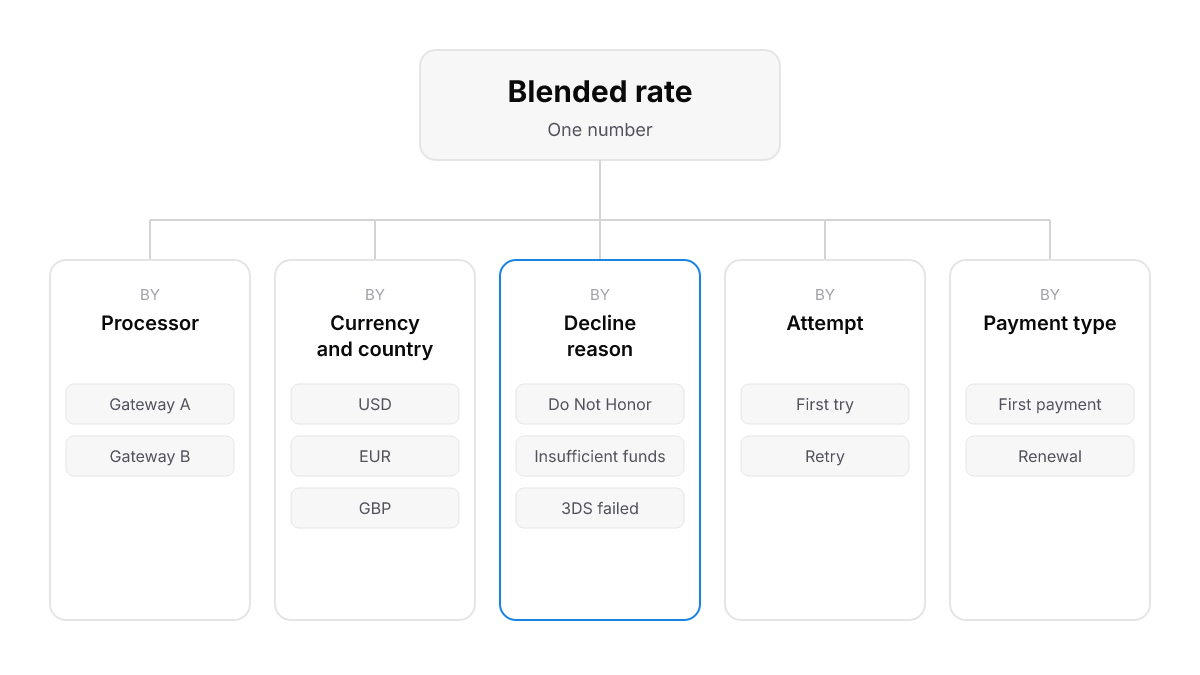
Split the blended rate before you act on it. Each cut points at a different fix.
What FloPay shows today
For any period, a merchant can pull approval rate and conversion from FloPay's checkout stats, plus a decline analysis that groups every declined or failed attempt by currency, decline reason and provider. Each attempt shows FloPay's normalized decline reason next to the provider's raw reason. The dashboard's Rebill Sales and Rebill Revenue cards show how much of the total came from recovered renewals.
Normalized reasons matter because every processor words its declines differently. FloPay translates Stripe, Worldpay and PayPal responses into one set of reasons, so a split by decline reason compares like with like across processors. The analytics and reporting guide covers the checkout event feed and recovery reporting.
What moves it
A better rate comes from giving good payments another fair chance and stopping the ones that can't clear. Here's what FloPay does on a decline:
- A second processor for a new card. When a new card is declined in checkout, FloPay can try the same card on the merchant's second processor (Stripe to Worldpay or back) before the buyer sees the refusal, if the merchant has switched failover on. A newly added gateway starts with failover off, so connecting it isn't enough on its own.
- The saved-card cascade. For a returning customer, FloPay tries the preferred saved card across the eligible gateways, refreshes a stale card token through the vault once, and then moves on to the next saved card.
- Knowing when to stop. The cascade stops at a failed 3DS check, a "too many attempts" response or an unsupported card. More tries after those won't help.
- Retry timing on renewals. Failed renewals get retries timed to the decline type within the billing cycle.
We don't rank these levers. Routing in depth is in how to improve checkout conversion with smarter routing, and the case for running more than one processor is in payment orchestration software. The exact rules for each decline reason are in the routing and reliability guide.
Renewals on saved cards
Subscription merchants should read renewals as a segment of their own. There's no buyer on the page to fix a typo or answer a bank challenge, and the card may have been saved months ago. We hold no comparison of first-payment and renewal rates, so we won't give one.
What FloPay does differently on a failed renewal: it starts a recovery campaign. Retries run inside the billing cycle, spaced by the subscription's cadence and the decline type, and each one uses the freshest saved card. Cards marked lost, stolen or expired are set aside, and the customer's next saved method is tried. A renewal that meets a bank challenge stops instead of risking a second charge.
How tokens keep a saved card usable is in what card tokenization is. What to require of your billing tool when renewals fail is in recurring billing software, and the campaign itself is on our subscription recovery page.
The short version
- Authorization rate is approved attempts divided by submitted attempts. Decide what an attempt is before you compare numbers.
- Read it per attempt and per payment. Every failed retry lowers the first, and every recovered payment raises the second.
- There's no single good rate. Compare your own segments against your own past.
- Split by processor, market, decline reason, attempt and payment type before you change anything.
- What moves it: a second processor for declined new cards, a saved-card cascade with a vault refresh, renewal retries timed to the decline, and stopping when another try can't help.
See how FloPay routes and retries a payment, start with accepting a payment, or visit FloPay.