3D Secure Authentication Failed: Why It Happens and Who Fixes It
Why a 3D Secure authentication failure happens, which failures belong to the cardholder's bank and which to the checkout, how to read them in your own data, and what we've fixed on FloPay.
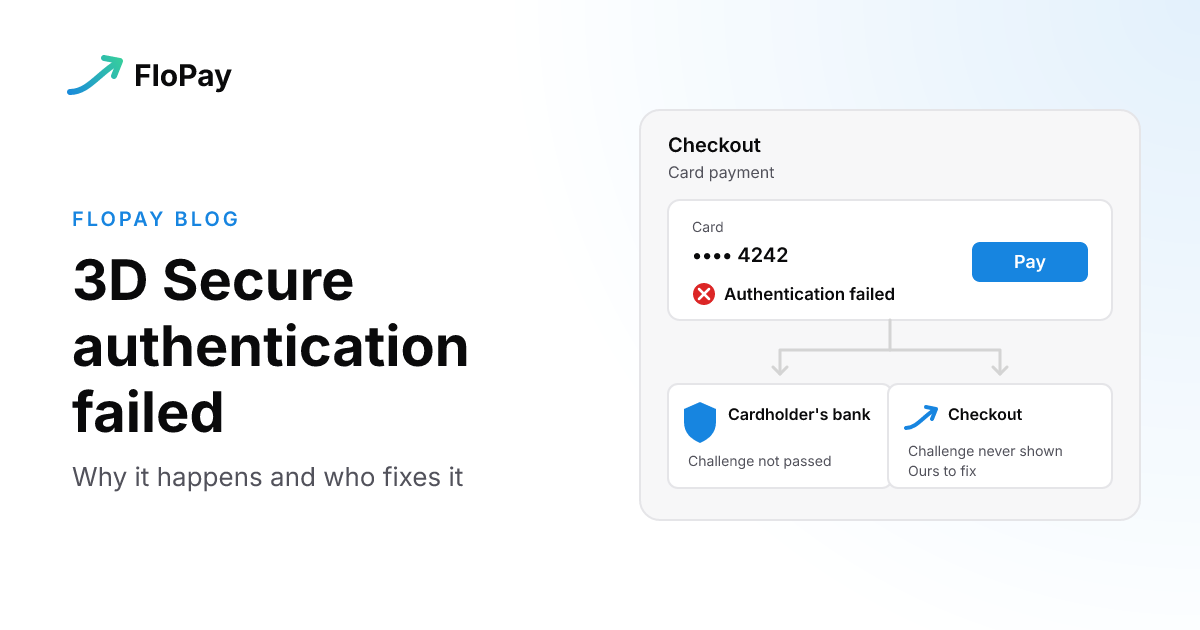
"3D Secure authentication failed" is one of the least helpful messages a checkout can show. It tells the buyer the payment didn't go through. It doesn't say who has to act: the bank, the buyer, the store or the payment platform.
This post is about that message. If you want the basics first, such as what 3D Secure is, how the frictionless and challenge flows work and whether you need it, start with our 3D Secure explainer. Here we go deeper on why a 3D Secure authentication failure happens, how to tell the causes apart in your own checkout data, and what we've fixed on FloPay when the problem was ours.
Why 3D Secure authentication fails
A 3D Secure failure has one of two sources. Either the card's bank ran its check and the buyer didn't get through it, or the check never reached the buyer properly. The first is for the cardholder to sort out with their bank. The second belongs to the checkout and the platform behind it.
When the bank and the cardholder are the cause
Stripe's guide to 3D Secure failures lists the common reasons on the cardholder's side:
- The cardholder never finished registering for 3D Secure with their bank, or has to register again after the card was renewed or reissued.
- The card's issuer doesn't support 3D Secure.
- The buyer entered the wrong password or personal details.
- The bank suspects fraud, for example a payment much larger than usual, and restricts the card.
- An unstable internet connection stops the check from completing.
- Repeated wrong entries lock the buyer out for a while.
Stripe wrote that guide for businesses in Japan, and we've left out the parts that only apply there. Its fixes are things the cardholder does: confirm their 3D Secure registration, reset a forgotten ID or password, check their connection, update their browser with JavaScript and cookies turned on, and contact the bank that issued the card if none of that works. A store can't change any of these. What it can do is tell the buyer clearly that the next step is their bank, or another card.
When the checkout is the cause
The other failures look the same to the buyer but have nothing to do with their bank. The challenge never opens, or it opens and never finishes, or the buyer passes it and the result never makes it back. The bank did its part and the checkout didn't. On FloPay, that's ours to fix. The next sections show how to tell which kind you're looking at.
Read the failure in your own data
We don't have a number yet for how many FloPay card payments get a challenge, or how many of those fail or are abandoned, so we won't give one. You can count your own, and the checkout gives you the signals to do it:
- Challenges. Every challenge emits a
3ds_challengeevent you can count. Put it next to payment attempts in your funnel, as the analytics guide describes. - Failed challenges. Your code hears about a failed challenge through the
onDeclinecallback. A direct API integration gets the decline reason3DS_FAIL. That reason also stops FloPay from trying another card or gateway. - Challenges still waiting. While the bank waits on the buyer, the payment attempt shows as
ACTION_REQUIRED. - On Worldpay. Closing the challenge emits
challenge_dismissed, and a challenge that ends with no result recordscustomer_abandoned. Each attempt also says whether 3D Secure ran and why, inthreeDsAppliedandthreeDsReason.
Together, these answer the first question that matters: did the buyer see a challenge at all?
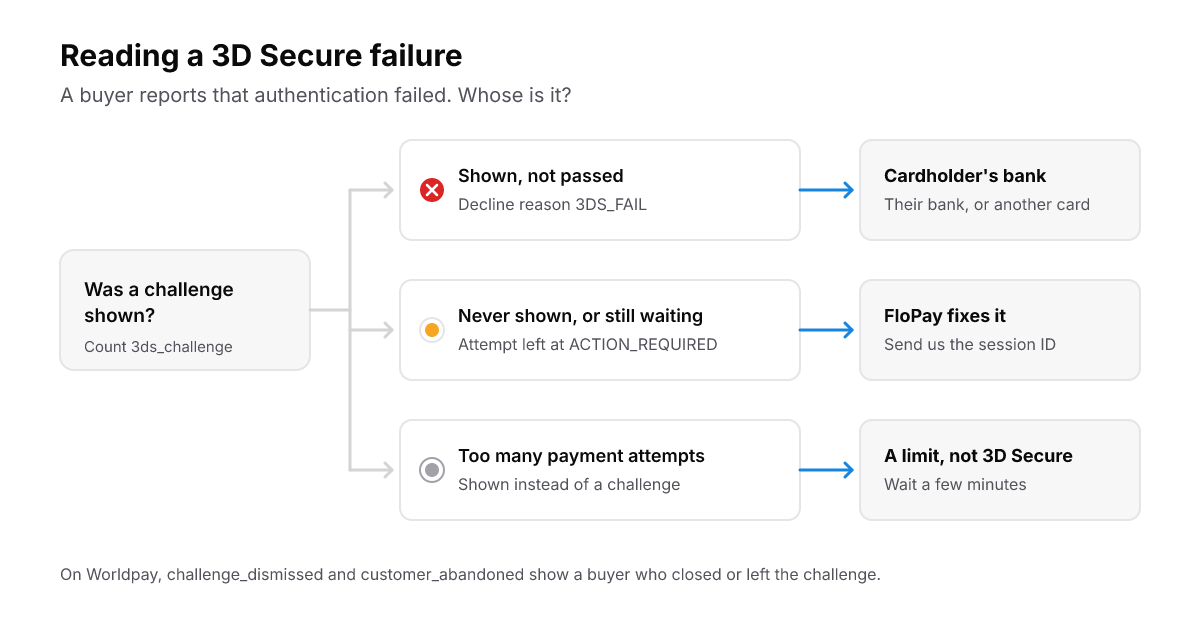
Start with whether a challenge was shown. The decline reason and the attempt's state tell you whose it is.
What to check first when buyers report a 3DS failure
When buyers tell you their payment failed 3D Secure, work through it in this order:
- Check whether the buyer saw a challenge. Compare
3ds_challengeevents with payment attempts for the sessions buyers reported. - Read the decline reason.
3DS_FAILmeans the bank ran the challenge and the buyer didn't pass it. That's for the cardholder to take to their bank, or they can pay with another card. - Look for challenges that never appeared or never finished. A challenge that never appeared, an attempt left waiting for action, or a lost result is ours to fix. Keep the FloPay form mounted, don't add your own challenge handling, and send us the session ID.
- Rule out the attempt limit. "Too many payment attempts were made. Please wait a few minutes and try again." is a limit on repeated tries, not 3D Secure. The buyer should wait a few minutes.
- On Worldpay, check the gateway. Make sure it has 3DS Flex approved, with your checkout sites in its approved callback origins. The Worldpay connector guide covers the setup.
If authentication passed and the payment was declined anyway, that's authorization, not 3D Secure. Payment Was Declined explains how to read the decline, and the authorization rate guide covers what moves approvals.
When the challenge never shows: what we've fixed
A challenge that never appears is the failure that's ours, so here's what we found and what we changed.
On Stripe. Our own end-to-end testing found that subscription and item-only checkouts sent back "3D Secure required" without the link to the bank's challenge. The buyer never saw the challenge, and the authentication failed. A 3DS-required answer now always carries that link.
On Worldpay. A live new-card payment that the bank sent back for authentication was resent with a mandatory challenge, but no challenge appeared. In November we shipped two changes. If the bank refuses that resend, the payment moves to the next ready gateway. And a payment we can't send with 3D Secure is never sent without it.
Why that Worldpay challenge didn't show is still open. Each such payment now logs what happened, so the next case tells us. We'd rather say that plainly than call it solved.
What stage testing taught us
Our 3D Secure explainer covers how the Stripe and Worldpay test challenges differ. Here's what we've learned since, worth knowing before you test your own checkout:
- The challenge can take a while to open. In one November stage run on Stripe, the form showed Processing for over 20 seconds before the Card authentication dialog appeared. A slow challenge isn't a missing one.
- A failed challenge is easy to spot. Pressing Fail showed the failure message on the form and as an alert, and the page never moved to success.
- Worldpay's challenge works end to end. On November 11, a Worldpay test card brought up the bank's challenge, a test code passed it, and the payment was authorized and captured.
- A limit can look like a missing challenge. On November 2, several of our stage runs showed "Too many payment attempts were made. Please wait a few minutes and try again." instead of a challenge. That was a limit on repeated payment attempts, not 3D Secure.
No real bank is involved on stage, so test on each processor and then check your first live payments. The stage testing guide lists every test outcome.
When a renewal needs a challenge
A renewal has no buyer to answer the bank, so FloPay stops that attempt and tries no other card or gateway. The subscription shows as past due. Because the bank's request is still open, FloPay holds the attempt until it can prove the request is closed, instead of counting it as a failed payment. If it can't settle it, the renewal goes to manual review.
The customer fixes it on the hosted manage payments page by adding or replacing a card. 3D Secure runs while they're there, and the new card becomes the default for their subscriptions.
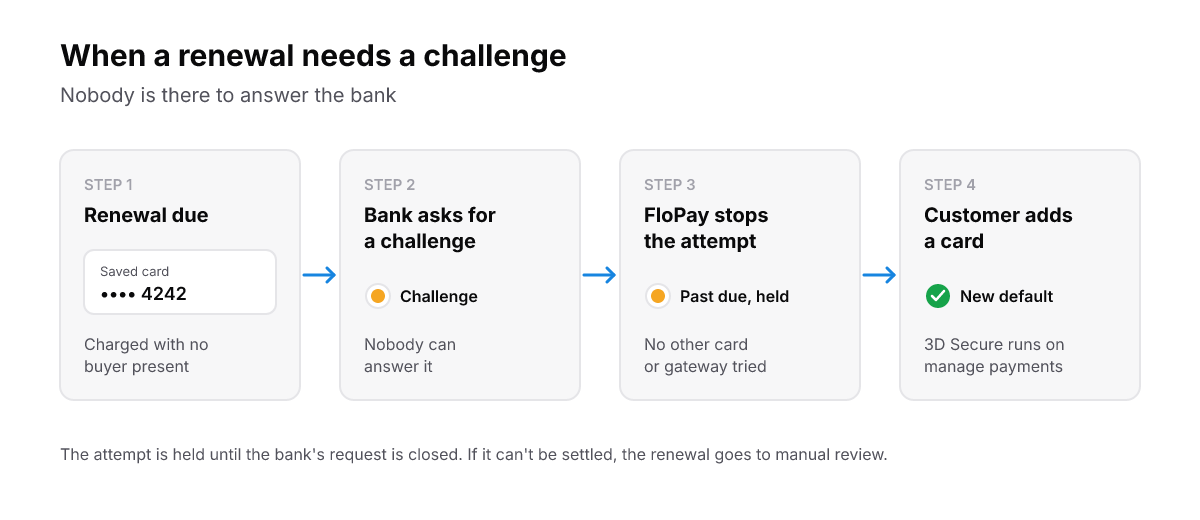
Nobody is there to answer the bank, so the renewal waits for the customer to come back.
Our docs give no set time for when the customer is asked back, so plan that part yourself. Dunning management covers how to bring customers back, and Subscription Recovery covers how FloPay handles renewals that fail.
The short version
- A 3D Secure failure comes either from the bank and the cardholder, or from the checkout. The fix depends on which.
- Missing registration, wrong details, suspected fraud and lockouts are for the cardholder to take to their bank.
- A challenge that never appears, never finishes or loses its result belongs to the checkout. On FloPay, that's ours.
- Read your own data:
3ds_challengefor challenges,3DS_FAILfor failed ones,ACTION_REQUIREDfor ones still waiting. - A renewal can't answer a challenge, so plan how the customer comes back to confirm a card.
See how FloPay accepts a payment, where 3D Secure fits among your dispute prevention controls, or visit FloPay.